
WinDirStat
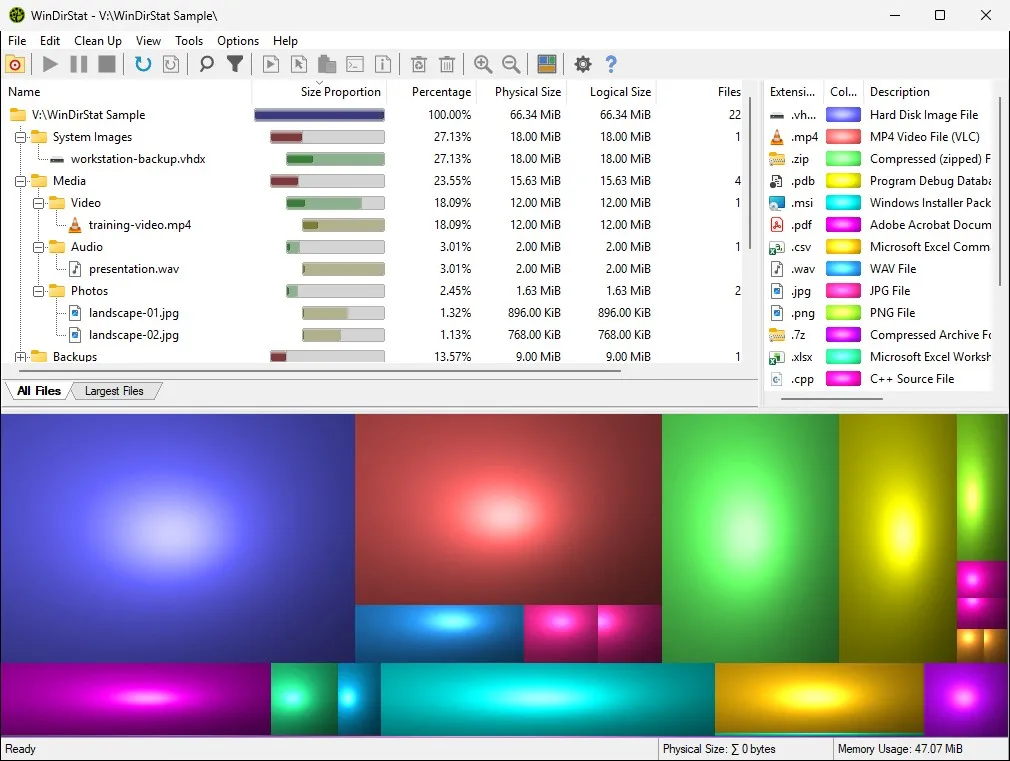
Disk usage analyzer for Windows that shows folders and file types as a colour-coded treemap, so you can find what is filling a drive.
What it does
- Scans a drive and shows folder sizes as a sorted tree
- Colour-coded treemap where the largest items are the biggest blocks
- File type list that shows which extensions take the most space
- Lets you open a folder in Explorer from the results
WinDirStat answers one question quickly: what is using the space on this drive? The treemap makes large folders and files stand out, so you do not need to click through every folder to find them.
Who it is for
WinDirStat suits an administrator who has to find space quickly on a file server, a shared PC or a user’s drive. For regular reporting over many servers, a monitoring tool is a better long-term choice.
Install and first run
- Download the program from the official site and run it as administrator on a server.
- Choose the drive or folder to scan.
- Sort the tree by size and expand the largest folders.
- Use the file type list to find unexpected large types, such as ISO or video files.
- Open the folder in Explorer to check it before you act.
The full method is in finding what fills a file server disk.
Safety
- Never delete on the spot. Find the owner and the reason first.
- Logs, backups and profile data often need approval before removal.
- On shared PCs, scan a profile only while that user is logged off.
Common tasks
Questions and answers
Does WinDirStat delete anything?
Not by itself. It shows sizes. Deleting is a separate action you choose, so review every item before you remove it.
Why does the scan take a long time on a file server?
Large shares contain millions of files. Scan outside working hours, or scan one folder at a time, to limit load.
Why do sizes differ from File Explorer?
WinDirStat can show physical size, which accounts for how the disk stores small files, and logical size, which is the file's length. Check the column you are reading.
Can I use it on a server without installing?
Yes. The program can run from a folder, which is useful on servers where installation is restricted. Follow your change process first.
Guides that use WinDirStat
- Clean Up Oversized User Profiles on Shared PCsHow to find the folders that bloat shared Windows PC profiles, using WinDirStat, and reduce them safely without losing user data.
- Write a Disk Cleanup Policy for Corporate PCsHow to define what may be cleaned on corporate Windows PCs, how to find the largest space users, and how to document the policy with screenshots.
- Plan File Server Capacity Before the Disk FillsHow to estimate file server growth from WinDirStat snapshots, set alert thresholds, and plan storage purchases with enough lead time.
- Find What Is Filling a File Server DiskA step-by-step method to find the folders and file types using space on a Windows file server, using WinDirStat, with safe review before any deletion.
- Archive Large Logs and Move Them Over SFTPHow to find oversized log folders with WinDirStat, compress them, and move the archives to a secure storage server with WinSCP.